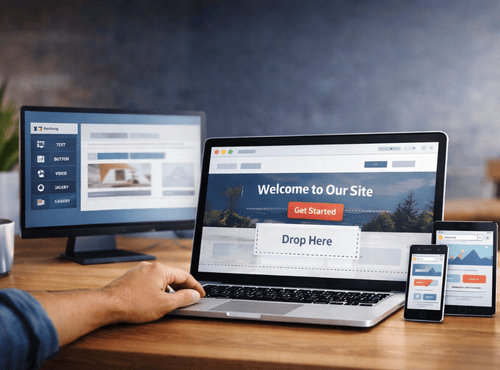
Building a website used to feel like assembling flat-pack furniture without instructions. Cables, code, and confusing jargon stood between good ideas and getting online. Drag-and-drop website tools changed all that. Now anyone with a mouse and a little curiosity can create pages that look as polished as agency work.
These tools work like digital Lego. You choose a block, place it on the page, and adjust it until it looks right. No programming, no headaches, and no late-night calls to tech-savvy friends. For freelancers, creators, and small businesses, this approach has turned website building from a chore into a creative project.
Why Drag-and-Drop Works So Well
Humans understand visuals better than code. Drag-and-drop editors speak the same language as everyday life. Want a photo next to some text? Grab it and move it. Need a button below a paragraph? Slide it down. The result appears instantly on screen.
This immediate feedback encourages experimentation. Instead of guessing how changes will look, you see them in real time. Confidence grows quickly, and the site evolves naturally rather than through technical trial and error.
What Makes a Great Builder
The best platforms share several qualities that keep the process enjoyable:
- Clear interface with obvious controls
- Mobile preview to check phone layouts
- Ready-made blocks for galleries, forms, and maps
- Undo buttons for fearless editing
- Fast loading templates
- Built-in hosting and security
When these features combine, creating a site feels more like arranging a poster than engineering software.
Tool One: Wix – Creative Freedom on Tap
Wix remains the poster child of drag-and-drop design. Its editor lets you place elements anywhere on the canvas, perfect for people who like artistic control. Hundreds of templates cover everything from cafés to photographers.
Extra apps add booking calendars, online stores, and chat windows. Beginners can start simple and add features as confidence grows. The platform’s friendly tutorials make the first steps painless.
Tool Two: Squarespace – Beauty Made Easy
Squarespace focuses on elegant design. Templates arrive with balanced fonts and colours, so even first attempts look professional. The editor is slightly more structured than Wix, guiding users toward clean layouts.
For creatives who care about branding, Squarespace offers strong blogging and portfolio tools. Drag-and-drop sections allow pages to be rearranged in seconds without breaking the style.
Tool Three: Weebly – Straightforward and Reliable
Weebly appeals to practical creators who want results without fuss. Blocks snap neatly into place, preventing messy alignment. Online store features connect smoothly with Square payments, handy for makers and market sellers.
The learning curve is gentle enough for absolute beginners, yet the finished sites remain polished and credible.
Tool Four: GoDaddy Website Builder – Speed Champion
GoDaddy’s builder aims for quick wins. After answering a few questions, the system generates a starting layout automatically. From there, dragging images and text customises the design.
This tool suits tradespeople and service providers who need an online presence fast rather than endless design choices.
Tool Five: WordPress with Elementor – Power Meets Simplicity
WordPress combined with Elementor brings drag-and-drop ease to the world’s most flexible platform. Users gain freedom to design visually while enjoying WordPress features such as blogs, plugins, and advanced SEO.
It is slightly more technical than the others but rewards creators who want room to grow beyond basic pages.
Starting Your First Page
Whichever tool you choose, the steps feel similar:
- Select a template close to your idea
- Replace demo images with your own photos
- Edit headings to describe your service
- Drag in a contact form or button
- Preview on mobile
- Publish and share
Most people finish a simple site in a few hours, not weeks.
Design Tips Without the Drama
You do not need to be a graphic designer to look professional. A few simple habits help:
- Use one or two fonts only
- Keep colours consistent
- Leave white space around text
- Choose high-quality images
- Make buttons obvious and friendly
Drag-and-drop tools make these principles easy to follow because elements can be moved until they feel balanced.
Turning Pages into Results
A website should invite action, not just admiration. Add clear calls such as “Book Now,” “Get a Quote,” or “Join the Newsletter.” Place contact details where visitors can see them without scrolling.
According to the Australian Bureau of Statistics, 56% of Australian businesses received orders via the internet in 2021-22, showing how essential websites have become for attracting customers and generating revenue.
Most builders include analytics so you can watch which pages attract attention. Learning from this data turns a pretty site into a useful business asset.
Overcoming Common Worries
Some creators fear their site will look like everyone else’s. In reality, personal photos, unique text, and thoughtful layout create individuality even within templates. Others worry about breaking something; drag-and-drop editors include undo buttons and backups for safe experimentation.
The biggest obstacle is often starting. Once the first page appears, momentum takes over.
Perfect for Side Projects
Drag-and-drop tools are ideal for passion projects: blogs, community groups, portfolios, or event pages. Because changes are quick, you can update information before each market day or exhibition without paying a developer.
This flexibility encourages creativity instead of locking ideas behind costs.
Growing Beyond the Basics
As your project expands, these platforms grow with you. Add online stores, membership areas, or appointment systems without rebuilding the site. What begins as a simple page can evolve into a full digital headquarters.
Upgrading usually requires only a click rather than a migration nightmare.
The Joy of DIY Creation
There is real satisfaction in shaping your own corner of the internet. Drag-and-drop tools turn website building into a playful activity rather than a technical battle. Each tweak brings instant reward, and soon you find yourself experimenting with layouts just for fun.
That sense of ownership is powerful. Your site becomes a reflection of your personality, not a template chosen by someone else.
When Extra Help Makes Sense
Even with easy tools, a little guidance can speed progress. Professionals can refine wording, improve search visibility, or design logos while you handle day-to-day updates. Collaboration works best when the foundation is already built.
Think of experts as coaches rather than gatekeepers.
Ready to Create?
The internet no longer belongs only to coders. With drag-and-drop builders, anyone can craft a site that looks stunning and works smoothly. Choose a tool, start moving blocks around, and watch your idea take shape.
The hardest part is deciding to begin. After that it is simply drag, drop, and done.
Looking for friendly guidance on choosing the right drag-and-drop tool?
Find practical resources, local listings, and support through Gold Coast Online Directory, helping DIY creators bring their websites to life.
FAQs
1. What is a drag-and-drop website builder?
A drag-and-drop website builder is a visual tool that allows users to create web pages by moving elements such as text, images, and buttons into place without writing code.
2. Are drag-and-drop website builders suitable for small businesses?
Yes. Drag-and-drop builders are ideal for small businesses, freelancers, and side projects because they simplify website creation, include hosting and security, and allow quick updates without technical knowledge.
3. Do I need coding skills to use a drag-and-drop website tool?
No coding skills are required. These tools are designed for beginners and provide visual editing, ready-made templates, and built-in features such as forms, galleries, and ecommerce options.
4. Can I build an online store with a drag-and-drop builder?
Yes. Platforms like Shopify, Wix, Squarespace, and Weebly include ecommerce features such as product management, payment processing, and shipping integration.
5. Will my website look unique if I use a template?
Yes. While templates provide structure, custom images, branding, layout adjustments, and personalised content help create a unique and professional-looking website.